> For the complete documentation index, see [llms.txt](https://graphicscat.gitbook.io/graphicscat/llms.txt). Markdown versions of documentation pages are available by appending `.md` to page URLs; this page is available as [Markdown](https://graphicscat.gitbook.io/graphicscat/documentation/overlayfx-system.md).
# OverlayFX System
## Overview
* Includes multiple built-in OverlayFX effects with scriptable dynamic control
* Easily apply/remove effects on target objects without custom logic
* Supports user-defined custom OverlayFX integration
* System Goal: Simple to use and highly extensible
* Visual Goal: Diverse and eye-catching effects
## Built-in Effects
* Fresnel
* Outline
* Tint
* Holographic
* TextureFlow
## Pairs with Bloom
* Can be used with URP Post-Processing Bloom
* Allows you to achieve a brilliant, glowing look with overflowing light effects
## Usage
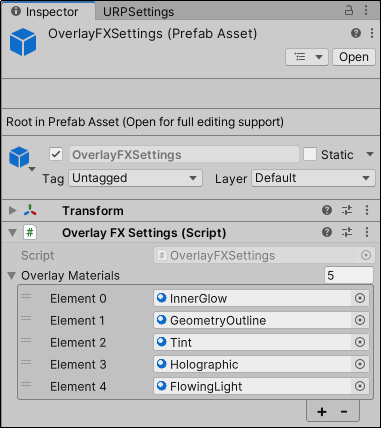
* Add OverlayFXSettings preset to scene (system uses this to reference Overlay materials)
* Control via OverlayFXManager.instance APIs:
* Apply effect: OverlayFXManager.instance.ApplyOverlay(target, overlayName);
* Remove effect: OverlayFXManager.instance.RemoveOverlay(target, overlayName);
* See OverlayFXSystemExample.cs for implementation samples
## Custom Effects Support
* Setup: Drag custom Overlay materials into OverlayFXSettings' OverlayMaterials list
* Usage: Call OverlayFXManager.instance.ApplyOverlay(targetObject, materialName)
## Performance Tips
* Mobile-friendly
* Best for highlighting a few key objects
* Avoid using on a large number of objects
* Suggest turning off Bloom for low-spec configurations
## Limitations
* Doesn't support models with multiple sub-meshes
## Enjoying this package?
* Give it a quick rating or leave a short review on the Unity Asset Store.
* Your feedback helps us improve and add even more features!
* [Review on Unity Asset Store](https://assetstore.unity.com/packages/slug/327691)